Photography Trends in Higher Education
In general, strive for creative, compelling, and storytelling moments that make use of captivating lighting and are artfully composed... and in focus. These never go out of style.

Campus and regional distinctions
Visually celebrate the attributes that make your campus or region unique. For example: winter in Minnesota, the Mississippi River, prairies and cityscapes, and cultural, arts, sporting, or lifestyle amenities that the surrounding area has to offer.

Candid moments
Try to avoid overly posed and composed scenarios. Instead, focus on genuine, legitimate moments of interaction, rapport, and synergy. Prospective students know the difference.

Drone shots and campus landscapes
Showing campus buildings, beautiful grounds, and other landmarks help students visualize themselves at the University of Minnesota.

Diversity and inclusion
Prioritize representation in photography that accurately reflects diverse cultures, identities, and abilities in a respectful and empowering way.

User-generated material
When possible, include imagery from students, as it will be naturally authentic to the student experience. This encourages community and gives the impression that your campus is keeping up with the times. This is especially great for social media content.

Environmental portraits
This conveys a sense of place and helps tell the story of the individual and the University of Minnesota. Environmental portraits are visually more compelling than headshots.
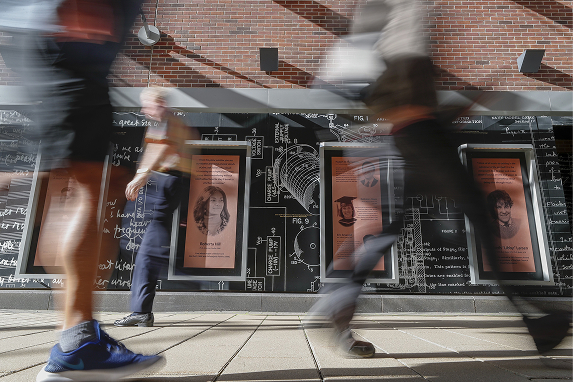
Sense of energy
Motion-blurred still photos, animation, cinemagraphs, and GIFs in traditional and web-based platforms convey excitement, emotion, and dynamism.
Note: Most of these trends also apply to videography.
Tips for Compelling Photography
A compelling photograph is the invitation for a reader to explore the text of your story and to further explore your department or college.
Here are some tips-aesthetic and technical-for taking candid, non-posed photographs. Candid moments give a photo authenticity and help illustrate exactly what you are writing about. They are more visually interesting than a posed picture or headshot.
These tips are written for smartphone usage but most can be applied to photography with a "point-and-shoot" or traditional digital SLR camera with interchangeable lenses.
Clean the lens
Before you begin, wipe your lens with a soft cloth. Smudges and dust blur and fog your photos.
Explain your intention
- Before you begin, discuss with your subject(s) that you are there to just record what they are doing or what is happening at an event. Although you may ask a subject to repeat an action or process, stress to them to just go about doing what it is that you are there to capture for your story.
- The subject should not look at the camera. This rule, more than anything, gives your photograph a sense of authenticity. It often helps to just say to your subject, "Pretend that I'm not here." (Fortunately, due to their ubiquity, smartphones seem to be a bit less "threatening" than a traditional camera, and subjects often feel more comfortable around them.)
Compose your photo
- Get close and fill the frame! If you do nothing else regarding the suggestions listed here, follow this tip. Featuring the subject prominently in the frame conveys immediacy and impact and makes for a more compelling photograph. One exception: If the subject of your photo is the environment, pay attention to what makes that environment interesting and highlight that quality.
- Practice the rule of thirds. Have the subject face into the frame. That is, if your subject is on the left or right side of the frame (rule of thirds), compose your shot so they are facing toward the center of the frame. Move yourself and the camera to do this; work around your subject.
- Look for moments that convey or explain the subject you are writing about. Remember, you are using a photo or photos to visually explain something. Look for reactions, interactions and engagement, or the "decisive moment"-the definitive instance that illustrates or tells the story of the project or event you are describing.
- If you are photographing fast-moving action or sequence, hold down the shutter for a burst of photos and choose the peak moment.
- Try to refrain from zooming your lens. This leads to camera shake, focus issues, and increased grain or pixel "noise." Be the human zoom, move yourself and camera closer!
Shoot a lot
- Exercise your creativity! Don't settle for one or two shots. Move around your subject. Try different angles and be aware of light and symmetry.
- Shoot closeups or detailed photos. This will give a different look for a secondary image or may explain better what you are trying to show.
- Having a variety to choose from will be helpful when selecting the one, two, or three photos you want to accompany your story or release.
Basic editing (with a smartphone)
- Use your smartphone's editing features for minimal adjustment of light, contrast, and sharpness. Don't over-correct your file. Cropping can be done in camera or in layout.
- Download, save, and send your selections in the largest file size possible.
- Keep your phone updated to get the latest camera software features for shooting and editing.
Employing these ideas and guidelines for candid, close, and creative photography will produce visually dynamic and unique images that will grab readers' attention and inform them in a way words cannot.
For further suggestions about how to photograph portraits and group photos using a smartphone, see this University Marketing Communications blog post.
If you are unable to locate a specific photo in the Photo Library or need to request a photographer's assistance, please click this link and complete this form.
Photo and Video Library
The Photo and Video Library features high-quality photos and videos from all of the University of Minnesota campuses. Content includes campus scenes, student life, classes and labs, buildings, and people.
FAQ
Who has access to the photo and Video Library?
Library access is available to faculty and staff through your University login.
- Vendors working with University departments should work through their department contact to get access through a sponsored account.
- Students working for a University department should talk with their supervisor to get access through a departmental account.
What are some helpful tips for using the photo and video library?
- Search is a powerful way for you to locate the media you're seeking.
- The file structure for photos and videos are the same.
- A "Lightbox" is a way for you to build collections so you can see your chosen media from a variety of folders stored in one convenient location. You cannot download files from this page, you must view each file separately to do that.
- The "Keywords" box is the organizational centerpiece. This searches the metadata of all files so that you see results containing everything in the library related to that search term.
- Check back often, as we're always adding new content to the library.
Can we add credits to the end of University videos?
To maintain a professional and cohesive institutional identity, University-produced videos should not include credit rolls or individual acknowledgments. This ensures content remains focused on the University’s mission and message rather than the specific production team or individual contributors.
Contact [email protected] if you have questions about the Photo and Video Library